Password Protect your Folders in Windows with My Lockbox
My Lockbox is a free security software for password protecting your folders in Windows. This is extremely useful when you want to hide files and folders from other users in Windows. The protected folder (lockbox) is hidden from any user and application of your system, including Administrator and System itself. It is not possible to access the lockbox.
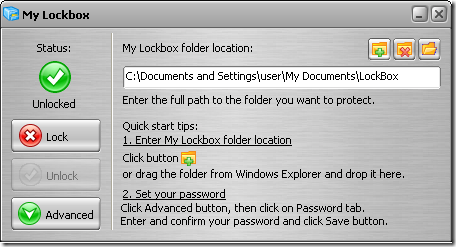
The program is extremely easy to use and you can set the lockbox location and the password during the setup procedure. Once the password is set lockbox will be hidden unless you enter the correct password. There is a control panel which allows you to change basic lockbox parameters like lockbox location, protection status, password.
Features of My Lockbox;
- Protect any folder on your computer can be password protected
- Instant protection - no file scrambling or moving to another place
- Lockbox folder is inaccessible even by the system administrators
- Lockbox folder is inaccessible both locally and remotely.
- Lockbox folder can be protected in Windows safe mode
- Windows XP x64 support and also Windows Vista
- Hotkeys support - you can popup Control Panel with a simple keystroke.
- Skinned user interface
- Completely free of cost
If you need help in configuration, then there is a Quick start guide.
Download My Lockbox (Freeware)
©2008 Life Rocks! 2.0. All Rights Reserved. The use of this feed on other websites is strictly prohibited


No comments:
Post a Comment